I ran hadoop fs -put sensor_archive.csv /data/raw/ against a multi-node cluster VM and watched it sit for eleven seconds before returning. Eleven seconds to copy a file that would have taken under a second on a local disk. My first reaction was that something was wrong. Nothing was wrong. That eleven seconds was the file being split into 128MB blocks, written to a DataNode, and then replicated twice more to two other DataNodes, all before the command handed control back to me. The delay was not overhead to eliminate. It was the entire point of the system, made visible.
That is the thing HDFS forces on you that S3 or a managed data lake never does. When storage is an API call, replication and block placement happen somewhere out of sight and you stop thinking about them. Run your own filesystem across a handful of nodes and you cannot avoid the physical layout of your data, because you are the one who configured the replication factor and you are the one whose job fails when a DataNode goes down mid-write.
The two roles that make it work
HDFS splits into exactly two kinds of node, and the split maps cleanly onto a distinction that shows up everywhere in distributed systems: metadata versus data.
The NameNode holds the filesystem’s metadata in memory. Directory structure, file-to-block mappings, permissions, and, critically, which DataNodes hold which block replicas. It does not store a single byte of actual file content. When I run hadoop fs -ls /data/raw/, the NameNode answers from memory without touching a DataNode. When I run hadoop fs -cat /data/raw/sensor_archive.csv, the NameNode tells the client which DataNodes hold the relevant blocks, and the client reads the actual bytes directly from those DataNodes, not through the NameNode. The NameNode is a directory, not a courier.
The DataNodes store the actual blocks on local disk and do nothing clever with them. They report their block inventory back to the NameNode on a heartbeat, and if a DataNode stops heartbeating, the NameNode notices and schedules re-replication of whatever blocks that node was holding, using one of the surviving replicas as the source.
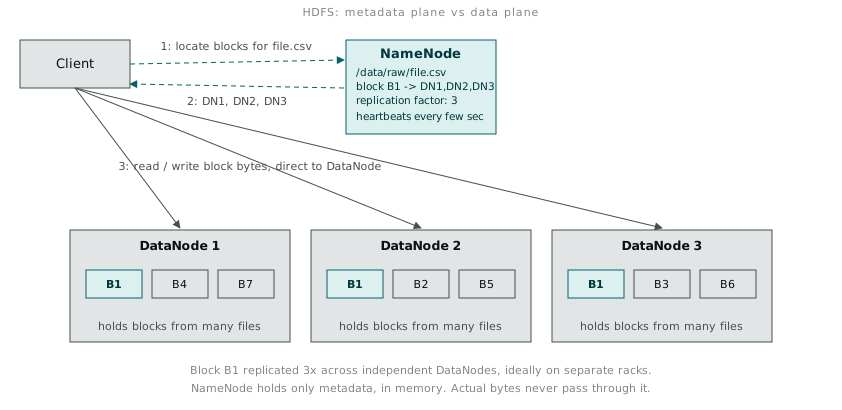
This split explains a design choice that seemed odd until I ran into it directly: the NameNode is a single point of failure in Hadoop 2.7 unless you configure high availability with a standby NameNode and a shared edit log, which the cluster I was working against did not have set up. Losing the NameNode does not lose any data, the blocks are still sitting on the DataNodes, but it does lose the map of where everything is. A filesystem with all its files physically present and no working directory is, for practical purposes, gone.
Replication is not a backup strategy, it is the availability strategy
The default replication factor is 3. Every block gets written to three different DataNodes, and Hadoop’s rack-awareness logic tries to place at least one replica on a different rack from the others, so a single rack failure (a switch dying, a power circuit tripping) does not take out every copy of a block at once.
hadoop fs -put sensor_archive.csv /data/raw/
hadoop fs -ls -h /data/raw/
# -rw-r--r--   3  hdfs supergroup  340.2 M 2018-08-15 09:41 /data/raw/sensor_archive.csv

hadoop fs -stat "%r replicas, %b bytes" /data/raw/sensor_archive.csv
# 3 replicas, 356711834 bytes
The 3 in the -ls output is not the file count. It is the replication factor for that file, and it is set per-file at write time, not globally fixed. A file I know is disposable, scratch output from an intermediate job, I would write with -D dfs.replication=1 and accept the risk, because re-running the job that produced it costs less than storing three copies of throwaway data. A file that took six hours to assemble I left at the default and did not think twice about the storage cost.
The block size matters for the same reason replication does. 128MB blocks (up from the older default of 64MB) exist because HDFS is tuned for large sequential reads of large files, not for lots of small files. Every block, no matter how small the actual data in it, consumes a metadata entry on the NameNode, held in memory. A directory full of small files does not just waste disk, it wastes the NameNode’s RAM, which is a much scarcer resource than disk ever is on a Hadoop cluster.
Commands that stopped feeling foreign after a week
The hadoop fs command set mirrors Unix filesystem commands closely enough that muscle memory transfers, with one caveat: everything needs the hadoop fs - prefix, and paths are HDFS paths, not local ones, unless prefixed with file://.
hadoop fs -mkdir -p /data/raw
hadoop fs -put local_readings.csv /data/raw/
hadoop fs -ls /data/raw/
hadoop fs -cat /data/raw/local_readings.csv | head -5
hadoop fs -get /data/raw/local_readings.csv ./downloaded_copy.csv
hadoop fs -du -h /data/raw/
hadoop fs -rm /data/raw/local_readings.csv
hadoop fs -rm -r /data/raw/
-get and -put are the two I reach for most, and both cross the boundary between the local filesystem and HDFS, which is a boundary worth being deliberate about. Every -put triggers the block split and replication process I watched take eleven seconds. Every -get pulls blocks back from whichever DataNodes hold them and reassembles the file locally, which is why fetching a large result set back down to a laptop for a quick check in pandas is a habit worth breaking. It is a much bigger operation than it looks.
Where HDFS sits in the stack
HDFS answers exactly one question: where does the data physically live, and how do we keep it available when a node dies. It does not answer how a job gets scheduled to run near that data, and it does not answer what computation runs against it. Those live in separate layers above it.
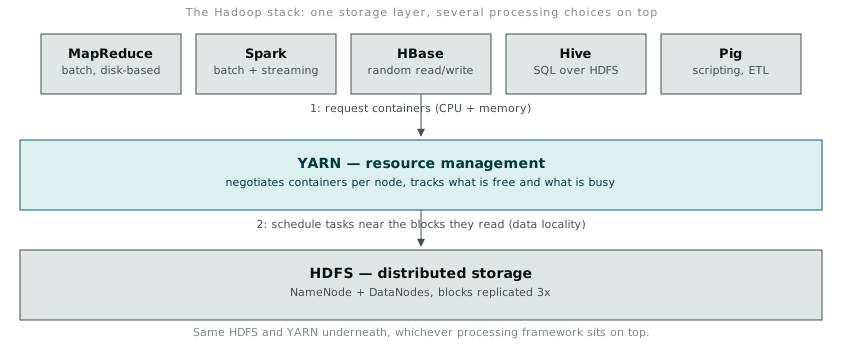
YARN sits above HDFS and handles resource negotiation: which node has spare CPU and memory right now, and which job gets to use it. Above YARN sit the frameworks that actually do computation, MapReduce, Spark, and others, and this is the layer where the ecosystem stops being one thing and becomes a set of competing options for the same underlying storage. HBase, which stores its own data as files on HDFS underneath a different access pattern entirely, sits at roughly the same layer. Hive and Pig sit a layer above that again, compiling declarative queries down into MapReduce or Spark jobs that then read from HDFS through YARN.
What struck me running all of this on one modest multi-node VM was how much coordination overhead exists purely to answer questions that a single machine never has to ask. Where is this block. Is a copy of it still available. Which node has spare capacity to run this task near that data rather than shipping the data across the network to reach idle compute. None of these questions exist until data and computation are spread across more than one machine, and once they do exist, HDFS, YARN, and everything built on top of them exist mainly to answer them without a human having to do it by hand for every job.