Two systems in the same company both have a table called customer. That should make merging them simple. It does not. The CRM export uses a customer ID that means nothing outside the CRM, the billing system has its own ID sequence, and the only thing both systems agree on with any reliability is a name field that one system stores as “John Smith” and the other stores as “SMITH, JOHN”. I was asked to produce a single customer view from both. It took longer than the two reports that were meant to consume the merged data.
Every data integration project I have touched underestimates this step. Extracting and loading is mechanical. Deciding that row 4,471 in one source and row 9,872 in another describe the same real person is not.
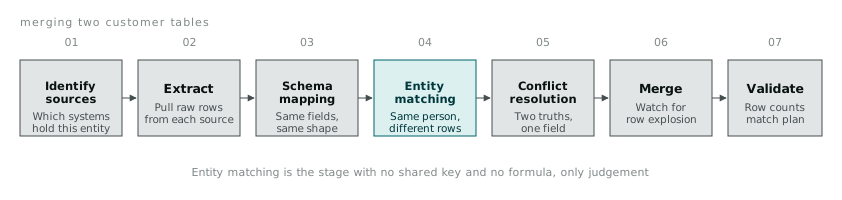
Schema mapping comes before matching, not after
Before any two records can be compared, their columns need to mean the same thing. One source might store a full name in a single customer_name field, another might split it into first_name and last_name, and a third might store it as LAST, First in a field called client. None of these are wrong. They are just different choices made by different teams at different times, usually without knowing the other system existed.
def normalise_name(raw_name, style):
    if style == 'last_comma_first':
        last, first = [p.strip() for p in raw_name.split(',')]
        return u'%s %s' % (first, last)
    elif style == 'single_field':
        return raw_name.strip()
    else:
        raise ValueError('unknown name style: %s' % style)
I write one normalisation function per source, not one clever function that tries to detect the format automatically. Auto-detection sounds appealing until it silently mishandles the one row in a thousand that does not fit the pattern the detector was written against, and a silent mismatch here is worse than a loud one, because it produces a merged record that looks fine and is wrong.
Entity matching: deciding two rows are the same thing
Once names and addresses are in a consistent shape, the actual matching starts. An exact match on a shared identifier is the easy case and, in my experience, the rare one. It only works when both systems already agree on a key, which is usually the reason someone wanted them merged in the first place.
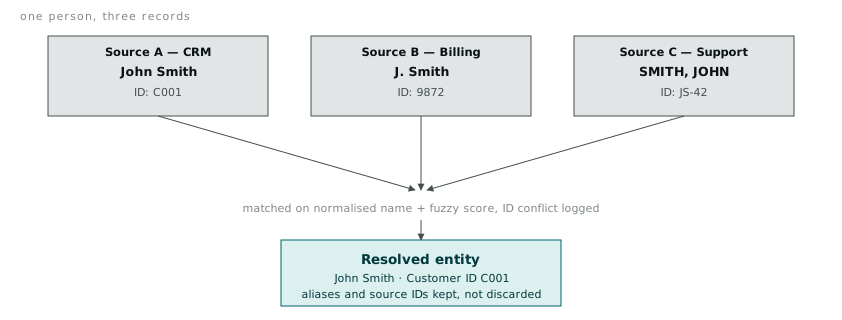
When there is no shared identifier, fuzzy matching on name, address, or both is the fallback. fuzzywuzzy wraps Levenshtein distance into a ratio that is easier to reason about than the raw edit distance:
from fuzzywuzzy import fuzz

fuzz.ratio('John Smith', 'J. Smith')               # 78
fuzz.ratio('John Smith', 'SMITH, JOHN')             # 55 without normalisation
fuzz.token_sort_ratio('John Smith', 'SMITH, JOHN')  # 100 after token sorting
token_sort_ratio splits both strings into words, sorts them, and compares the sorted versions, which fixes the reordering problem that plain ratio gets caught on. I run it after the case and whitespace normalisation shown above, not instead of it, because a fuzzy match score is only useful once the more mechanical differences are already out of the way.
Setting the match threshold is a judgement call, not a formula. I usually start high, 90 or above counts as an automatic match, route anything between 70 and 90 to a manual review queue, and treat anything below 70 as a non-match. On a file of a few thousand rows, a manual queue of a few hundred borderline cases is a day’s work, not a blocker. On a file of a few million rows the threshold needs tuning until the queue is a size a person could plausibly get through, which sometimes means accepting a slightly worse match rate in exchange for a queue that does not sit untouched for a month.
Conflict resolution: when two truths disagree
Matching tells you which rows describe the same entity. It does not tell you what to do when those rows disagree on a value. Source A says the customer’s address is in Richmond, source B says Brunswick. Both records were entered by a human at some point, and there is no automatic way to know which one is current.
I default to a precedence rule when I can justify one: most recently updated wins, or the system of record for that particular field wins (billing owns the address used for invoicing, the CRM owns the address used for outreach, and I keep both rather than picking one). Where there is no defensible rule, I flag the conflict in a _conflicts column rather than picking silently:
def resolve_address(row):
    if row['billing_address'] == row['crm_address']:
        return row['billing_address'], None
    return row['billing_address'], row['crm_address']

merged[['address', 'address_conflict']] = merged.apply(
    lambda r: pd.Series(resolve_address(r)), axis=1
)
The address_conflict column stays null most of the time and gets populated exactly when the two sources disagree, which makes it easy to audit later without re-running the whole merge.
One-to-many joins quietly multiply your rows
A join that should add columns can add rows instead, and this is the mistake I have made more than once. Merging a customer table against a support ticket table on customer ID, where one customer has filed six tickets, produces six rows for that customer, each carrying a duplicated copy of every customer-level field. If the next step sums a customer-level revenue column without noticing, revenue gets counted six times over for that one customer.
merged = customers.merge(tickets, on='customer_id', how='left')
print len(customers), len(merged)  # row count changed, and it should have
I have started checking len() before and after every merge as a matter of habit. If the row count grew and I was not expecting a one-to-many relationship, something in my assumption about the data was wrong, and it is much cheaper to catch that at the merge step than three transformations later, when a total looks implausibly large.
Enrichment fills gaps, carefully
Sometimes the fields you need are not in either source, and the fastest way to get them is a lookup against something public. I have used scraping to fill postcode-to-region mappings and company details from a public business register, using requests and BeautifulSoup to pull structured fields out of an HTML page:
import requests
from bs4 import BeautifulSoup

resp = requests.get('http://example-registry.gov.au/company/%s' % abn, timeout=10)
soup = BeautifulSoup(resp.text, 'lxml')
company_name = soup.find('span', {'class': 'entity-name'}).text.strip()
I keep this kind of enrichment separate from the core merge, cached to a local file rather than fetched live, and rate-limited well below whatever the source could actually handle. The two failure modes here, getting the site blocked, or hammering someone else’s public infrastructure, are both entirely avoidable and both embarrassing.
None of the steps above are individually difficult. What makes data integration the most underestimated task on a project is that they all have to happen in the right order, on real data that breaks the assumptions built into whichever step is running, and the failure of any one step is not always obvious until three steps later, when a total does not add up.