I tried to design my first HBase table the way I had just finished designing a MongoDB collection for the same sensor data, one document per reading, and got a schema that technically worked and performed badly the moment I asked it to do anything beyond a single-row lookup. HBase is not a document store with a different syntax. It is a third kind of thinking entirely, and pretending otherwise cost me an afternoon of rewriting.
I had already been through this shift twice before. Relational tables normalise data into entities and let SQL’s query planner figure out how to join them back together at read time, a design I covered when modelling the same sensor readings as MongoDB documents instead. MongoDB flips that: model around the shape of a single read, embed what gets read together, and accept some duplication. HBase asks a third, sharper question. Not “what does this entity look like” and not “what does one read look like,” but “what is the exact row key I will look up, and what happens to performance if I get that key wrong.”
Row key first, everything else after
An HBase table has exactly one index: the row key. There is no secondary index in the relational sense, no arbitrary WHERE clause that the engine can satisfy efficiently on a field you didn’t plan for. Rows are stored in byte-sorted order by row key, and every access pattern that isn’t a lookup or a range scan on that key ends up as a full table scan. Designing an HBase table means designing the row key, and only then filling in the columns.
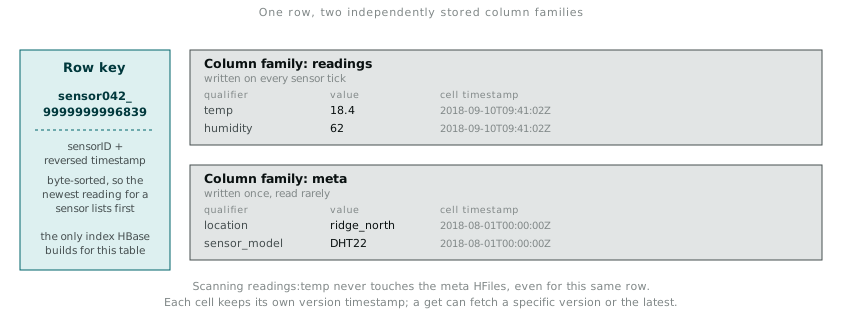
For the sensor archive, the row key I settled on was sensorID_reversedTimestamp: the sensor’s identifier, an underscore, and a timestamp with its digits inverted (or subtracted from a max value) so that sorting ascending by byte order puts the most recent reading for a given sensor first, not last. Row-key design in HBase is really this kind of small, deliberate trick, over and over, to make byte-sort order line up with the order you actually want to read in.
sensor042_9999999996839  ->  most recent reading for sensor042
sensor042_9999999996840  ->  reading just before it
sensor043_9999999996839  ->  most recent reading for sensor043
Get this wrong and the failure mode is not an error, it is silence: the table works, queries return correct answers, and every scan that should have touched three rows quietly touches three thousand instead. Nothing in HBase warns you when this happens. You find out from the clock.
Column families group by access pattern, not by entity
Within a row, columns are grouped into column families, and this is the second decision that has nothing to do with how a relational or document model would carve up the same data. A column family is a storage and access unit: HBase physically stores each family in its own set of files on HDFS, and reading one family does not touch the files backing another family, even for the same row.
For the sensor table, I split into two families. readings holds temp, humidity, wind_kph, values written constantly, on every sensor tick, and read together whenever anyone wants the actual measurements. meta holds location, sensor_model, install_date, values written once and almost never rewritten, read together only when someone needs context about the sensor rather than its readings.
hbase shell
create 'sensor_data', 'readings', 'meta'

put 'sensor_data', 'sensor042_9999999996839', 'readings:temp', '18.4'
put 'sensor_data', 'sensor042_9999999996839', 'readings:humidity', '62'
put 'sensor_data', 'sensor042_9999999996839', 'meta:location', 'ridge_north'
put 'sensor_data', 'sensor042_9999999996839', 'meta:sensor_model', 'DHT22'

get 'sensor_data', 'sensor042_9999999996839'
scan 'sensor_data', {COLUMNS => 'readings:temp', LIMIT => 5}
The reason to split families this way rather than dumping everything into one is I/O. A scan restricted to readings:temp only reads the HFiles for the readings family; it never touches the meta files at all, regardless of how many other columns that row happens to carry. If I had put readings and metadata in one family, every scan for temperature would drag the rarely-changing metadata along for the ride, on every row, on every scan. Every cell also carries its own timestamp, HBase’s built-in versioning, so readings:temp for one row key can hold several versions over time and I can fetch a specific one or let HBase return the latest by default.
Loading it in bulk from HDFS
Putting rows one at a time through the shell is fine for a handful of test rows and useless for a real archive. ImportTsv reads a tab-separated file straight out of HDFS and writes it into HBase in bulk, which is the path I actually used once the sensor archive was sitting in /data/raw/ from the earlier Hadoop work.
hadoop jar /usr/lib/hbase/hbase-server.jar importtsv \
  -Dimporttsv.columns=HBASE_ROW_KEY,readings:temp,readings:humidity,meta:location \
  sensor_data /data/raw/sensor_archive_tsv/
The row key has to already be present as a column in the source file, in the exact order the row key components need to sort, because ImportTsv will not construct a composite key for me. Getting the source TSV’s first column formatted as sensorID_reversedTimestamp before the load, rather than trying to fix it inside HBase afterwards, saved a second full reload.
Querying back out with a filter rather than a full scan:
Scan scan = new Scan();
scan.setFilter(new SingleColumnValueFilter(
    Bytes.toBytes("readings"), Bytes.toBytes("temp"),
    CompareFilter.CompareOp.GREATER, Bytes.toBytes("30.0")
));
ResultScanner scanner = table.getScanner(scan);
for (Result r : scanner) {
    System.out.println(Bytes.toString(r.getRow()));
}
ValueFilter and its relatives still run as a scan under the hood, HBase does not index on cell value, so this filter reduces what gets returned to the client, not what gets read off disk. It is a client-side convenience layered on top of a full family scan, not a substitute for a well-designed row key. One gotcha with the example above: Bytes.toBytes("30.0") compares as a lexicographic byte string, not a numeric value. Lexicographic ordering means “9.0” sorts after “30.0” because the character “9” comes after “3”. For numeric comparisons to work correctly, the values need to be stored as Bytes.toBytes(30.0) (the double overload, 8 bytes of IEEE 754), not the string representation, and the filter comparator needs to match.
What the same data costs in each model
Laying the three approaches side by side made the trade-off concrete in a way no amount of reading about column-family stores had managed on its own.
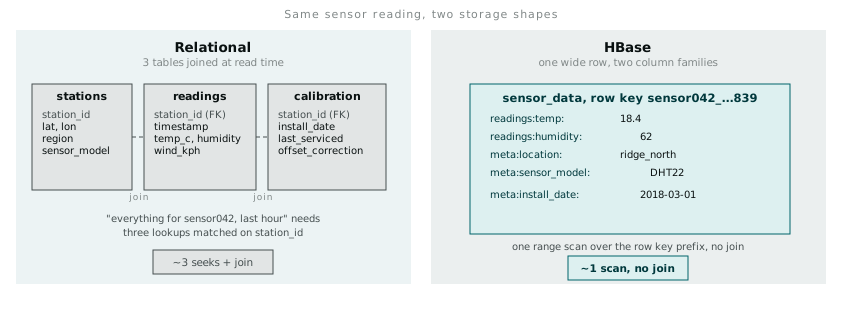
The relational version, three normalised tables joined at read time, the same shape I used when comparing parallel processing approaches against a single-machine baseline, answers “give me everything about sensor042 in this time range” with a join across stations, readings, and calibration history, and the query planner decides how. The HBase version answers the same question with a single range scan over a row key prefix, no join, because I already decided at design time exactly what “everything about sensor042 in this time range” would look like on disk, and built the key to make that scan contiguous.
That is the trade a column-family store actually makes. Flexibility at query time moves to the schema design phase. Get the row key and family split right for the access pattern you actually have, and reads are fast because the data was already laid out for that exact question. Get it wrong, or have the access pattern shift under you six months later, and there is no query planner coming to rescue you. There is only a re-design and a bulk reload.