A colleague sent me a text file last week and asked if I could “just pull out the phone numbers.” The file was a dump of customer service notes, one entry per line, and the numbers were written every way a person can write a phone number: with brackets, without brackets, with dashes, with dots, with a country code, without one. There were 4,000 lines. Doing it by hand was not an option.
SQL could not help. The data was not in a table yet, it was in a text file with no structure to query against. Excel could not help either, not without an unreasonable number of nested MID and FIND formulas that would break on the first line that did not match the pattern I had tested against. What I needed was something that could describe the shape of a phone number and then find every occurrence of that shape, regardless of the exact characters used to write it.
That is what a regular expression is. Once I understood that, most of my hesitation about regex went away.
The pattern is a description, not a search term
The mistake I made early on was treating regex like a fancy version of “find and replace.” It is not. A regex pattern describes a shape, and the engine looks for text that matches that shape anywhere in the string.
Take a date written as 05/08/2017. I want to pull the day, month, and year out separately. The pattern:
^(\d{2})/(\d{2})/(\d{4})$Every piece of that pattern means something specific:
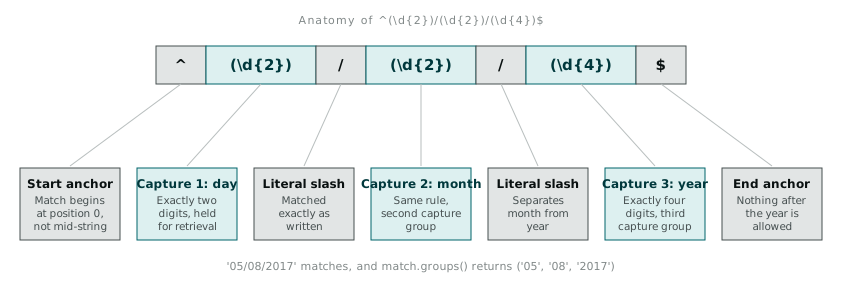
^ anchors the match to the start of the string. Without it, the pattern would match a date buried anywhere inside a longer string, which is sometimes what you want and sometimes not. \d is a character class meaning “any digit, 0 through 9.” The {2} after it is a quantifier: exactly two of the preceding thing. So \d{2} means “exactly two digits.” The parentheses around each \d{2} and \d{4} create a capture group, which lets me retrieve that specific piece of the match later rather than the whole string. The / is a literal character, matched exactly as written. The $ anchors to the end of the string.
Read as a sentence, the pattern says: from the start of the string, match two digits, a slash, two digits, a slash, four digits, then the string must end. Nothing before it, nothing after it.
In Python:
import re

pattern = re.compile(r'^(\d{2})/(\d{2})/(\d{4})$')
match = pattern.match('05/08/2017')

if match:
    day, month, year = match.groups()
    print day, month, year  # 05 08 2017
I use re.compile when a pattern gets reused across many lines, because compiling once and matching many times is faster than passing the raw string to re.match every time. For a one-off check it does not matter, but a pipeline processing tens of thousands of lines notices the difference.
The functions that matter
The re module has more functions than you need on a daily basis. Four cover almost everything I do:
re.search(pattern, string) finds the first match anywhere in the string and returns a match object, or None if nothing matches. Always check for None before calling .group() on the result, because calling a method on None is how a clean pipeline crashes at 2am on a line nobody anticipated.
re.findall(pattern, string) returns every non-overlapping match in the string as a list. If your pattern has capture groups, you get a list of tuples instead of a list of strings. This is the one I reach for most, because most of my problems are “find every instance of X in this document,” not “find the first one.”
re.sub(pattern, replacement, string) replaces every match with something else. Useful for normalising messy input before you even try to extract structure from it, stripping out repeated whitespace or collapsing three different dash characters down to one.
re.compile(pattern) compiles a pattern into a reusable object with .match(), .search(), and .findall() methods attached. Worth it whenever the same pattern runs against more than a handful of strings.
Going back to the phone number problem
The customer service notes had phone numbers in at least six formats:
0412 345 678
(03) 9123 4567
03-9123-4567
+61 412 345 678
9123 4567
0412345678
There is no single simple pattern that elegantly handles all of these while staying readable, and I decided readability mattered more than cleverness here. I wrote one pattern to catch mobile numbers and a second for landlines, rather than one enormous pattern trying to do both:
mobile_pattern = re.compile(r'(?:\+?61|0)4\d{2}[\s-]?\d{3}[\s-]?\d{3}')
landline_pattern = re.compile(r'(?:\(0[2-8]\)\s?|0[2-8][\s-]?)?\d{4}[\s-]?\d{4}')
The (?:...) groups are non-capturing groups. I use these when I need to group parts of a pattern for the quantifier that follows, but I do not actually want that piece back when I call .groups(). The ? after the whole group makes the country code prefix optional, since plenty of numbers in the file were written locally without it.
[\s-]? means “an optional whitespace character or a dash.” That single fragment is doing the work of matching the space in 0412 345 678, the absence of anything in 0412345678, and the dash in 03-9123-4567, all with one piece of pattern.
Running re.findall with these two patterns across the file pulled out 3,847 numbers on the first pass. The other 153 lines had numbers written in formats I had not accounted for (a few written with dots instead of spaces, one column of numbers with an extension appended after a comma). I did not try to catch every edge case in the regex itself. I ran a second, looser pattern over just the lines that failed the first pass, inspected what came back, and adjusted from there.
Extracting structure, not just matching text
Finding a match is only half the job. The point of most extraction work is turning unstructured text into something tabular. This is where capture groups earn their keep, because they let you pull a match apart into its constituent fields on the way into a row.
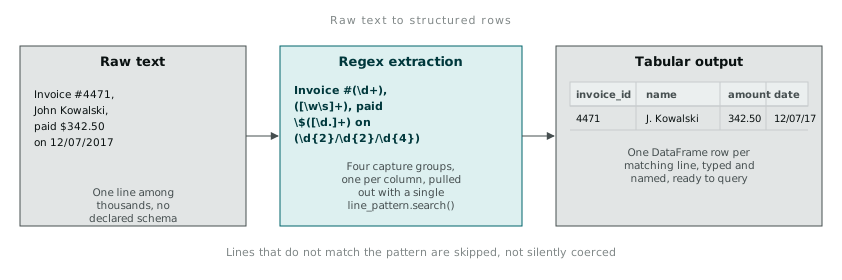
A line like Invoice #4471, John Kowalski, paid $342.50 on 12/07/2017 becomes a row with four columns once you write the pattern to capture each field:
line_pattern = re.compile(
    r'Invoice #(\d+), ([\w\s]+), paid \$([\d.]+) on (\d{2}/\d{2}/\d{4})'
)

rows = []
for line in open('invoices.txt'):
    m = line_pattern.search(line)
    if m:
        invoice_id, name, amount, date = m.groups()
        rows.append({
            'invoice_id': invoice_id,
            'name': name.strip(),
            'amount': float(amount),
            'date': date,
        })

df = pandas.DataFrame(rows)
Notice I check if m: before unpacking groups. Every line in a real file eventually breaks the assumed format, whether that is a typo, a different invoice template mixed into the same export, or a blank line someone left in. The lines that do not match get silently skipped here, which is fine for a first pass, but in production I would log them somewhere rather than let them vanish. A regex that “just works” on the sample you tested it against is not the same as a regex that works on the file you will actually receive next month.
Lookahead, and when I actually reach for it
Lookahead assertions, written as (?=...) for a positive lookahead or (?!...) for negative, check that something follows the current position without consuming it as part of the match. I do not use these often, but there is one case where they save real effort: splitting a number formatted with thousands separators without capturing the commas themselves.
re.findall(r'\d(?=(\d{3})+(?!\d))', '1234567')I will be honest that I do not write lookahead patterns from memory. I look up the syntax nearly every time, because it is the one part of regex that does not read like a sentence to me the way the rest does. That is fine. Knowing when a tool exists and knowing when to look up its exact syntax are both legitimate parts of being competent with it.
What I have stopped doing is reaching for a string of .split() and .replace() calls chained together when a text field has real structure to it. Five lines of string manipulation, each handling one more edge case discovered after the last one broke, usually turn out to be a worse version of a ten-character regex that describes the actual shape of the data once and matches it consistently.