I spent an afternoon confused about why my word count for “customer” and “Customer” did not match a colleague’s count from the same file. We were both counting occurrences of the word across a batch of support tickets. My number was higher. His had already lowercased everything before counting; mine had not. It was a small thing, and it cost us half a meeting to notice.
That is the kind of mistake text preprocessing exists to prevent. Before you can run any analysis on text, whether that is counting words, building a classifier, or feeding a model, you have to decide what counts as “the same word,” what counts as noise, and how a sentence becomes something a machine can actually work with. NLTK gives you the tools. It does not make the decisions for you.
Tokenisation: deciding what a “word” is
A string is just a sequence of characters until you decide where one unit ends and the next begins. NLTK’s word_tokenize does this more carefully than string.split(), which only breaks on whitespace and leaves punctuation stuck to words.
from nltk.tokenize import word_tokenize, sent_tokenize

text = "I called support twice. They didn't fix it, and I'm frustrated."

sentences = sent_tokenize(text)
# ["I called support twice.", "They didn't fix it, and I'm frustrated."]

words = word_tokenize(sentences[1])
# ['They', 'did', "n't", 'fix', 'it', ',', 'and', 'I', "'m", 'frustrated', '.']
Two things surprised me the first time I looked closely at that output. First, word_tokenize splits “didn’t” into did and n't, treating the contraction as two grammatical units rather than one token. That is deliberate, and it matters if you are doing anything with part-of-speech tagging downstream, since “n’t” behaves like a negation marker, not like a word ending in a mysterious apostrophe. Second, punctuation comes back as its own token. The comma after “it” is a token in the list, same as any word.
Whether that punctuation-as-token behaviour helps or hurts depends entirely on what you are building next. For a bag-of-words model counting word frequency, I strip punctuation tokens out immediately. For anything sentence-structure-aware, I leave them in, because a full stop is doing real work marking sentence boundaries that sent_tokenize already used to split the text in the first place.
sent_tokenize runs a pretrained model (Punkt) to decide where sentences end, which is why it correctly treats the full stop in “support twice.” as a sentence boundary rather than getting confused by an abbreviation like “Dr.” elsewhere in the text. A naive split on . would have broken “Dr. Smith” into two sentences. NLTK’s tokeniser generally does not.
Lowercasing and why it is not automatic
NLTK does not lowercase text for you. That is a choice you make explicitly, usually right after tokenising:
words_lower = [w.lower() for w in words]I lowercase almost everything by default, because for most of the analysis I do (word frequency, topic extraction, simple classification) “Customer” and “customer” should count as the same word. The exception is anything where case genuinely carries information, like distinguishing an acronym from an ordinary word, or named entity work where capitalisation is a signal that a word is a proper noun. I have not needed that distinction yet in the ticket analysis I am doing, so I lowercase everything without much hesitation. I would think harder about it on a different dataset.
Stop words: removing the words that do not discriminate
Stop words are the common words (the, is, at, and, a) that appear in nearly every document regardless of topic, and therefore carry little information about what makes one document different from another. NLTK ships a stop word list per language:
from nltk.corpus import stopwords

stop_set = set(stopwords.words('english'))
filtered = [w for w in words_lower if w not in stop_set]
I convert the list to a set before filtering, since membership checks against a set are roughly constant time, while checking against a list scans the whole thing for every word. On a document with a few hundred words this difference is invisible. On a corpus of ten thousand support tickets processed in a loop, it is the difference between a script that finishes while I get coffee and one that finishes overnight.
The default stop word list is a reasonable starting point, not a finished decision. I ended up adding domain-specific stop words to it for the support ticket work: “please,” “regards,” “thanks,” and a handful of other words that appear in nearly every ticket regardless of the actual issue being reported, and were therefore diluting the signal the same way “the” would.
Stemming: collapsing word variants down to a root
“Running,” “runs,” and “ran” are three different tokens after tokenisation, but for most counting and classification purposes they represent the same underlying concept. Stemming strips suffixes to collapse variants down to a common root, without needing to understand grammar the way a full lemmatiser would.
from nltk.stem import PorterStemmer, LancasterStemmer

porter = PorterStemmer()
lancaster = LancasterStemmer()

for word in ['running', 'runs', 'ran', 'easily', 'fairly']:
    print word, '->', porter.stem(word), '/', lancaster.stem(word)
Porter and Lancaster do not agree with each other, and neither one produces an actual dictionary word most of the time. Porter is the gentler of the two; Lancaster strips more aggressively and can collapse words together that a human reader would want kept apart. I default to Porter unless I have a specific reason to want the more aggressive collapsing, because over-stemming is a harder mistake to notice than under-stemming. You do not get an error when two unrelated words end up sharing a stem. You just get a slightly worse model, quietly.
The full sequence looks like this end to end:
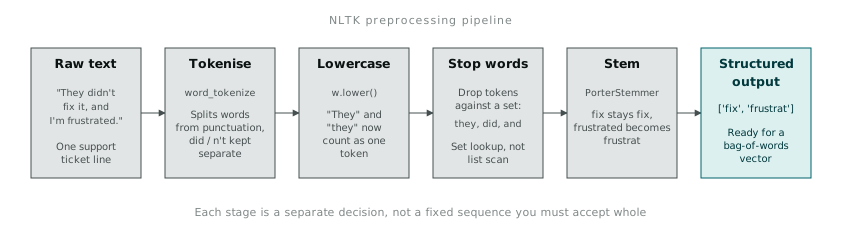
def preprocess(text):
    tokens = word_tokenize(text.lower())
    tokens = [t for t in tokens if t.isalpha()]
    tokens = [t for t in tokens if t not in stop_set]
    stemmed = [porter.stem(t) for t in tokens]
    return stemmed
t.isalpha() is doing quiet but important work in that filter, dropping punctuation tokens and pure numbers in one pass rather than writing a separate regex to strip them. It is a small thing, but it is the kind of small thing that only becomes visible once you have looked at what word_tokenize actually returns for messy real-world text, rather than assuming.
From words to numbers: bag of words
Once text is tokenised, normalised, and filtered, you still have a list of strings. A model needs numbers. The simplest way across that gap is a bag-of-words representation: count how many times each word appears across the vocabulary, and represent each document as a vector of those counts.
from collections import Counter

vocab = set()
doc_tokens = [preprocess(doc) for doc in documents]
for tokens in doc_tokens:
    vocab.update(tokens)

vocab = sorted(vocab)
vectors = []
for tokens in doc_tokens:
    counts = Counter(tokens)
    vectors.append([counts.get(w, 0) for w in vocab])
This throws away word order entirely, which sounds like a bigger loss than it usually turns out to be in practice. For a lot of classification tasks (spam versus not-spam, this ticket category versus that one), which words are present and how often matters more than the order they appear in.
TF-IDF (term frequency, inverse document frequency) improves on raw counts by down-weighting words that appear in most documents in the corpus, even after stop word removal has already caught the most obvious offenders. A word appearing in every single ticket, even a domain-specific one that survived the stop list, is not helping distinguish one ticket from another, and TF-IDF pushes its weight down accordingly rather than requiring you to add it to a stop list by hand.
Getting text out of structured documents first
Not all text starts as a plain string. A good chunk of the support ticket data actually arrived as an XML export from the ticketing system, with the ticket body buried inside nested tags alongside metadata I did not want mixed into the text.
from bs4 import BeautifulSoup

with open('tickets.xml') as f:
    soup = BeautifulSoup(f.read(), 'lxml')

for ticket in soup.find_all('ticket'):
    body = ticket.find('body').text
    priority = ticket.find('priority').text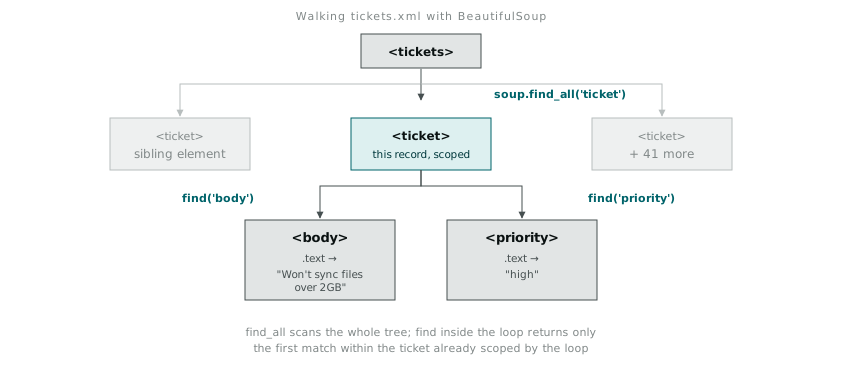
find_all('ticket') walks the whole tree and returns every matching element as a list, while find('body') inside the loop returns just the first match within that specific ticket element, which is what you want once you are already scoped to one record. .text pulls the text content out of an element, ignoring the tags around it, which is the whole point of using BeautifulSoup here rather than trying to regex the tags out by hand. I did try the regex approach first, briefly, before remembering that parsing arbitrary XML with regular expressions is a well-known way to end up with a script that breaks the moment someone nests a tag one level deeper than you tested for.
Once the body text is out of the XML structure, it goes through exactly the same tokenise, normalise, filter, stem pipeline as any other block of text. The preprocessing does not care where the string came from. Getting a clean string out in the first place is a separate problem, and worth treating as one.